Family party games are having a moment
That's great news, and it comes with a catch. A family party game isn't really a product. It's an evening. The noise around the table, the argument over a rule, the kid who won't stop talking about her win at breakfast the next morning. A product photo can show somebody a box. It can't show them a Tuesday night.
That's why video works so well here. In a few seconds, a good marketing video answers what a photo and a paragraph of copy never will:
- How the game works
- Who can play
- Why it's fun
- What sets it apart
So here's the goal to aim at: create video content as replayable as your game. Something people want to watch twice, send to a friend, and bring up again at next week's game night.
That holds whether you're an indie publisher getting your first game out the door, or an established studio with a shelf of hobby titles looking to round out the catalog with something the whole family can play. The strategy doesn't change. Only the budget does.
.webp)
Animation or Live Action? (Good news: you can have both)
Before you shoot a single frame, you've got a decision to make. Real people at a real table, or animation?
For a party game, live action is tempting, and often right. The product is people laughing at each other, and nothing sells that like watching it happen. But animation gives you things a camera never will: total control of the look, characters who can do anything, licensed properties you could never cast, and the freedom to change a shot six months from now without renting a house and recasting a family.
The best part? You don't have to pick a lane forever. We've made the same kind of video both ways for Bicycle Playing Cards, live action for Pokeno and 3D animation for Color Addict, and both do the exact same job.
Quick rule of thumb:
- Live action when the fun is in the faces.
- Animation when the fun is in the world.
- Either one when the fun is in the components. That comes down to budget, timeline, and how much control you want down the road.
1. Sell the feeling, not the features
Most game marketing describes mechanics. Families aren't shopping for mechanics. They're shopping for an evening.
So lead with the room, not the rulebook. Short gameplay clips that catch the reactions. Different settings: holidays, birthdays, a rainy Saturday, the hotel room on vacation. Light text overlays for the premise and nothing more. You want a parent to watch twenty seconds and picture their own table.
What this looks like in practice:
- A thirty-second montage of a single round
- The funny, chaotic moments rather than the clean ones
- A hook in the first three seconds, because that's all you get
This is your teaser, the video doing all the emotional heavy lifting. It isn't trying to teach anybody anything. It's trying to get somebody to say "oh, we'd love this." Save the rules for the next one.
2. Answer "will we actually play this?"
Every family has a shelf of games nobody plays. Your buyers know it, and it's the quiet objection sitting behind most abandoned carts. A how-to-play video kills that objection before it forms.
If the teaser is the hook, the "How to Play" video is the handshake. Different video, different job, different length. Skipping it is one of the most common and most expensive gaps we see.
Keep it to setup, objective, a turn, and how a round ends. Simple and approachable. If somebody can follow your game in sixty seconds, they believe their family can too, and that belief is what they're actually buying.
Run a longer tutorial on the site and YouTube, and cut shorter versions for social.
And it doesn't stop working at checkout. Printed on the box as a QR code, it's the thing that gets your game opened on the first night instead of shelved. We've built exactly that for Bicycle three times over, promotional and instructional at once, linked straight from the packaging.
3. Feed the Campaign Page (and the Product Listing)
Your video doesn't just live on social. Some of the hungriest real estate you own is the page where people actually pledge or buy.
Start with crowdfunding. If you're launching on Kickstarter, Gamefound, BackerKit or anywhere similar, the campaign video is doing more work than any other asset you'll make. It's the first thing a backer watches, it's often the only thing they watch, and it has to carry the pitch, the designer, the components, and the reason to believe you'll actually deliver. That's a different animal from a teaser. Longer, more personal, built like a pitch instead of a trailer. We're a certified Kickstarter partner, and we've made these for campaigns that funded well past seven figures.
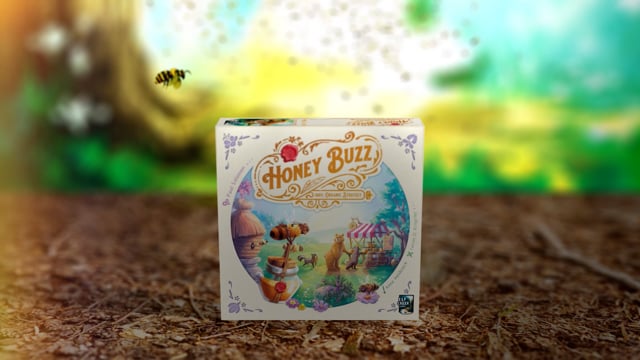
And it's rarely just one campaign. We made the campaign video for Honey Buzz, then came back for the Fall Flavors expansion, which is how most game lines actually go. Once the look is established, the second campaign costs less and moves faster, because you're extending a world instead of building one from scratch.
Then there's everywhere else people buy games. Amazon's product carousel takes video. So does your Shopify page, and so does just about every retailer that lets you upload media. Plenty of publishers leave those slots empty or drop in a box photo and call it done.
And a campaign page isn't just a video player at the top. It's a long scroll that has to stay interesting for several thousand pixels. We pull all of that out of the same production:
- Looping GIFs of a component in motion, a card flip, a miniature turning
- Still renders of the box, the full table spread, or individual pieces at any angle you need
- Section headers and dividers built from the same assets, so the page looks like one thing
- Social cards and update graphics for the campaign's run
Key idea: one production should dress the whole page, not just fill the player at the top.
4. Let other people do the selling
A polished commercial tells a buyer your game is fun. Another family laughing at it proves your game is fun. Guess which one sells more boxes.
Build that supply on purpose instead of hoping it shows up:
- Ask buyers to post clips of themselves playing, and make it easy to
- Send games to family, parenting and board-game creators, with real creative freedom
- Feature customer and creator video on the product page, not just on social
- Capture testimonials about why families keep coming back to it, not about components
The creative freedom matters more than you'd think. Hand a creator a script and you get an ad. Hand them the game and you get the real thing. We Make Treasure worked with Wil Wheaton to produce a series of influencer videos as a brand ambassador for Bicycle Games.
5. Close it at the cart
By the time somebody lands on your product page, attention isn't the problem anymore. The last reason not to buy is.
A short product video there should answer all of this, without making anybody read a spec table:
- How many players
- What ages
- How long a game takes
- Whether it's easy to learn
- Whether it works for adults, kids, or both
Show the box contents. Show hands on components. Keep it tight. This isn't the place for story or atmosphere, you already spent those earlier in the funnel.
Then reuse that same cut in retargeting ads for people who visited and left. They've already seen the pitch. What they need is a reminder and an answer to whatever question stopped them.
6. Build It to Travel
This is where a lot of game marketing falls down. A gorgeous 16x9 video gets uploaded everywhere, and on Instagram Stories it shows up as a tiny letterboxed rectangle floating in a sea of black. Great video, wrong shape, and nobody stops scrolling.
Your video needs to be built to travel, through the funnel and across every platform you're on.
Cut it for the funnel. One shoot should hand you a sequence, not a single asset:
- A 6-second hook for cold audiences who've never heard of you
- A 15 to 30-second cut that builds a little story and earns some interest
- A 45 to 60-second version that explains, answers questions, and converts
Each one is doing a different job at a different stage. Together they walk somebody from "what is that?" all the way to "add to cart," and they all came out of the same footage.
Size it for the destination. Same video, different frames:
- 9x16 vertical for Stories, Reels, TikTok and Shorts. Full screen, thumb-stopping, and where brand new players are most likely to find you.
- 1x1 or 4x5 for in-feed posts, which take up way more screen real estate than you'd expect.
- 16x9 for YouTube, your website, product pages, retail displays and the loop playing at your con booth.
Plan it before you shoot. This is the part that actually saves you money. If we know on day one that a shot has to work vertically and horizontally, we frame for both. Figure it out afterward and you're cropping somebody's head off, or paying to shoot the whole thing again.
Key takeaway: A video that only works in one place is really only half a video.
7. One Shoot, Every Asset
Read the six sections above and the math starts looking expensive. A teaser, a how-to-play, creator content, a product-page cut, and a dozen crops and edits on top of it. That reads like a whole year of budgets.
It isn't. It's one production, planned properly from the start.
A single well-run shoot yields:
- The hero cut for the campaign page or the homepage
- A how-to-play video, long for the site, short for social and the box QR
- Vertical crops for TikTok, Reels and Shorts
- A tight product-page cut for conversion
- GIFs and stills for ads, email, retail listings and your crowdfunding page
The savings come from planning, not from cutting corners. You decide at the storyboard stage that one session has to give you a 30-second emotional cut and a 60-second instructional one, and you shoot for both. Decide afterward and you're paying for a second shoot.
Closing
The best marketing video for a family party game isn't the most expensive one. It's the one that captures what your game does to a room and makes somebody want to be in that room.